The Blue Ridge Parkway Hiking Trails

A Planned Trip Up The Blue Ridge Parkway
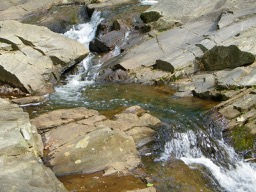
The Blue Ridge Parkway is actually the most visited of all American National Parks. The Parkway extends 469 miles mostly along the crest of the Blue Ridge mountains through North Carolina and Virginia. It encompasses some of the oldest sites of both prehistoric and early European settlement in the country. Colonel Joseph Hyde Pratt first suggested the parkway in 1912, and it was begun during the administration of President Franklin D. Roosevelt. The project was a major contributor to helping the people of the area get through the Great Depression with significant work done using the Civilian Conservation Corp. Originally called the Appalachian Scenic Highway it wasn’t actually completely finished until 1987. The Blue Ridge Parkway contains almost 400 miles of hiking trails that aren’t just a natural wonderland but offer a remarkable window into the history of the mountains. Much of the Parkway’s trails and exhibits deal with the first hundred years in this country as settlers moved west seeking land and opportunity and leaving a permanent mark on the mountains.

Below you will find a directory of the hiking trails along the Parkway and a copy of The National Park Service map of the parkway in one complete downloadable HD pdf.

We hope you find our copy of the map and the trail guide useful.

Please Note: A Blue Ridge Parkway trip is measured by mile markers or posts starting with 0 at the entrance in Virginia all the way to MP 469 at its end in Cherokee, North Carolina. The location of trails are marked by these mile posts (MP).

LOCATION OF BLUE RIDGE VIRGINIA HIKING TRAILS BY MILEPOST NUMBER

Milepost 5.9Mountain Farm Trail (self-guiding, from Humpback Visitor Center to pioneer farmstead) Length: 0.25 Miles Skill Level: Easy

Milepost 6 Appalachian Trail (Humpback Gap parking area to Humpback Mtn., elev. – 3650 feet) Length: 2 Miles Skill Level: Strenuous

Milepost 8.4Catoctin Loop Trail (leg stretcher) Length: 0.3 Miles Skill Level: Moderate

Milepost 8.8Greenstone Trail (self-guiding; Greenstone geology formation; oak hickory forest) Length: 0.2 Miles Skill Level: Moderate

Milepost 17.6 The Priest (view) Length: 0.1 Miles Skill Level: Easy

Milepost 18.5 White Rock Falls Trail Connection Length: 2.9 Miles Skill Level: Moderate

Milepost 20 White Rock Falls Trail (follows stream to small falls) Length: 0.9 Miles Skill Level: Moderate

Milepost 26.3 Big Spy Mountain (view into Shenandoah Valley; good for stargazing) Length: 0.1 Miles Skill Level: Moderate

Milepost 34.4 Yankee Horse (to logging RR exhibit & small waterfall) Length: 0.2 Miles Skill Level: Moderate

Milepost 38.8Boston Knob (leg stretcher) Length: 0.1 Miles Skill Level: Easy

Milepost 47.5 Indian Gap (to Indian Rocks; good seasonal rhododendron display) Length: 0.3 Miles Skill Level: Moderate

Milepost 55.2White Oak Flats (leg stretcher) Length: 0.1 Miles Skill Level: Easy

Milepost 60.8 Otter Creek Trail (begin at Otter Creek Campground) Length: 3.5 Miles Skill Level: Moderate

Milepost 63.1 Otter Lake Trail (around Otter Lake) Length: 0.8 Miles Skill Level: Moderate

Milepost 63.6James River Trail (Self-guiding to canal locks) Length: 0.2 Miles Skill Level: Easy

Trail of Trees Trail (self-guiding to James River Overlook) Length: 0.5 Miles Skill Level: Moderate

Milepost 74.7 Thunder Ridge Trail (leg stretcher loop to view of Arnold Valley) Length: 0.1 Miles Skill Level: Easy

Milepost 78.4 Apple Orchard Falls Trail (Sunset Field Overlook to view of Apple Orchard Falls; National Recreation Trail) Length: 1.2 Miles Skill Level: Strenuous

Milepost 79.7Onion Mountain Loop Trail (leg stretcher through Appalachian deciduous forest with rhododendron display) Length: 0.1 Miles Skill Level: Easy

Milepost 83.1Fallingwater Cascades Trail (National Recreation Trail; loop to view of cascades) Length: 1.6 Miles Skill Level: Moderate

Milepost 83.5Flat Top Trail (leads to highest of three prominent peaks in area) Length: 4.4 Miles Skill Level: Moderate

Cross Rock Trail (spur off Flat Top Trail; unique geological features) Length: 0.1 Miles Skill Level: Moderate

Milepost 85.7 Abbott Lake Trail (loop around Abbott Lake) Length: 1.0 Miles Skill Level: Easy

Milepost 85.9Elk Run Trail (self-guiding loop nature trail from Peaks of Otter Visitor Center) Length: 0.8 Miles Skill Level: Easy

Johnson Farm Loop Trail (loop to restored mountain farm) Length: 2.1 Miles Skill Level: Moderate

Harkening Hill Trail (elevation -3300 feet; begin at Peaks of Otter Visitor Center) Length: 3.3 Miles Skill Level: Moderate

Balance Rock (spur trail off Harkening Hill Trail; unique geological formations) Length: 0.1 Miles Skill Level: Moderate

Milepost 86Sharp Top Trail (from camp store to summit of Sharp Top Mtn.; elevation – 3875 feet; 360 degree panoramic view) Length: 1.5 Miles Skill Level: Strenuous

Milepost 91Appalachian Trail (VA 695 to Sharp Top Mtn. Overlook) Length: 1.9 Miles Skill Level: Moderate

Milepost 92.5 Appalachian Trail (Sharp Top Mtn. Overlook to Harvey’s Knob Overlook) Length: 2.9 Miles Skill Level: Moderate

Milepost 95.4 Appalachian Trail (Harvey’s Knob Overlook to Motvale Overlook) Length: 0.6 Miles Skill Level: Moderate

Milepost 95.9Appalachian Trail (Montvale Overlook to Taylor’s Mountain Overlook) Length: 1 Miles Skill Level: Moderate

Milepost 96 Spec Mine Trail (USFS Trail begins near Montvale Overlook, to State Rt. 645 in Botetourt County) Length: 2.8 Miles Skill Level: Strenuous

Milepost 97 Appalachian Trail (Taylor’s Mtn. Overlook to Blackhorse Gap) Length: 0.8 Miles Skill Level: Moderate

Milepost 110.6 Stewarts Knob Trail (view) Length: 0.05 Miles Skill Level: Easy

Milepost 114.9Roanoke River Trail (self-guiding river loop) Length: 0.35 Miles Skill Level: Easy

Milepost 120.4 Roanoke Mountain Summit Trail (view) Length: 0.11 Miles Skill Level: Moderate

Milepost 120.5Chestnut Ridge Trail (adjacent to Roanoke Mtn. Campground) Length: 1.75 Miles Skill Level: Moderate

Milepost 121.4 Roanoke Valley Horse Trail (begins US Hwy 220, parallels Parkway to Milepost 110.6) Length: 18.5 Miles Skill Level: Moderate

Milepost 123.2Buck Mountain Trail (to summit view) Length: 0.53 Miles Skill Level: Moderate

Milepost 154.5Smart View Loop Trail (around picnic area) Length: 2.6 Miles Skill Level: Moderate

Milepost 167.1Rock Castle Gorge Trail (loop from campground along ridge over Rocky Knob and into gorge for 7-mile return to campground) Length: 10.8 Miles Skill Level: Strenuous

Hardwood Cove Self-Guiding Nature Trail (part of Rock Castle Loop) Length: 0.8 Miles Skill Level: Moderate

Milepost 169Black Ridge Trail (Rocky Knob Visitor Center to Black Ridge to Grassy Knoll and back to Visitor Center) Length: 3.1 Miles Skill Level: Moderate

Rocky Knob Picnic Loop Trail (leg stretcher around picnic area) Length: 1.0 Miles Skill Level: Easy

Milepost 176.2 Mountain Industry Trail (Mabry Mill) Length: 0.5 Miles Skill Level: Easy

Milepost 179.2 Round Meadow Creek Loop Trail (walk through a stream bottom forest) Length: 0.5 Miles Skill Level: Moderate

Milepost 213 High Meadow Trail (leg stretcher) Length: 1.35 Miles Skill Level: Easy

Fisher Peak Loop Length: 2.25 Miles Skill Level: Moderate

NORTH CAROLINA TRAILS BY MILEPOST
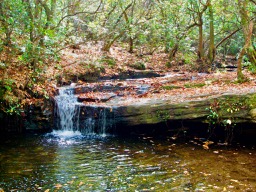
Milepost 217.5Cumberland Knob Trail (ideal lazy-day walk) Length: 0.5 Miles Skill Level: Easy

Gully Creek Trail (rewarding loop that meanders by stream) Length: 2 Miles Skill Level: Strenuous

Milepost 218.6 Fox Hunters Paradise Trail (view) Length: 0.2 Miles Skill Level: Easy

Milepost 230.1Little Glade Millponds (easy loop stroll around pond) Length: 0.4 Miles Skill Level: Easy

Milepost 238.5Cedar Ridge Trail (great for day hike; vistas and forests) Length: 4.2 Miles Skill Level: Moderate

Bluff Mountain Trail (parallels Parkway to Milepost 244.7) Length: 7.5 Miles Skill Level: Moderate

Milepost 241Fodder Stack Trail (great variety of plants) Length: 2.89 Miles Skill Level: Strenuous
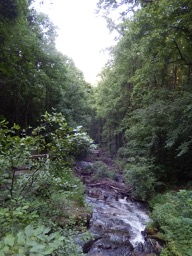
Milepost 243.7 Grassy Gap Fire Road (wide enough for side-by-side hiking) Length: 6.5 Miles Skill Level: Moderate

Basin Creek Trail (access from back-country campground) Length: 3.3 Miles Skill Level: Moderate

Milepost 244.7 Flat Rock Ridge Trail (forest path with vistas) Length: 5.0 Miles Skill Level: Moderate

Milepost 260.3 Jumpingoff Rocks Trail (forest path to vista) Length: 1.0 Miles Skill Level: Easy

Milepost 264.4 The Lump Trail (to hilltop view) Length: 0.3 Miles Skill Level: Easy

Milepost 271.9 Cascades Trail (self-guiding loop to view of falls) Length: 0.5 Miles Skill Level: Moderate

Milepost 272.5 Tompkins Knob Trail (to Jesse Brown Cabin) Length: 0.6 Miles Skill Level: Easy

Milepost 294Rich Mountain Carriage, Horse, & Hiking Trail Length: 3 Miles Skill Level: Moderate

Flat Top Mountain Carriage, Horse & Hiking Trail Length: 3 Miles Skill Level: Moderate

Watkins Carriage, Horse & Hiking Trail Length: 3.3 Miles Skill Level: Easy/Moderate

Black Bottom Carriage, Horse, & Hiking Trail Length: 0.5 Miles Skill Level: Easy

Bass Lake Carriage, Horse & Hiking Trail Length: 1.7 Miles Skill Level: Easy

Deer Park Carriage, Horse, & Hiking Trail Length: 0.8 Miles Skill Level: Moderate

Maze Carriage Horse & Hiking Trail Length: 2.3 Miles Skill Level: Moderate

Duncan Carriage, Horse, & Hiking Trail Length: 2.5 Miles Skill Level: Moderate

Rock Creek Bridge Carriage, Horse, & Hiking Trail Length: 1.0 Miles Skill Level: Easy

Milepost 294.1 Figure 8 Trail (short, self-guiding loop nature trail) Length: 0.7 Miles Skill Level: Easy

Milepost 294.6 Trout Lake Hiking & Horse Trail (loop) Length: 1.0 Miles Skill Level: Easy

Milepost 295.9 – Green Knob Trail (to Green Knob) Length: 2.3 Miles Skill Level: Moderate/Strenuous

Milepost 296.4 – Boone Fork Trail (stream, forest, and meadows) Length: 4.9 Miles Skill Level: Moderate/Strenuous

Milepost 297 – Price Lake Loop Trail (loop around Price Lake) Length: 2.3 Miles Skill Level: Moderate

Milepost 304.4 Linn Cove Viaduct Access Trail Length: 0.16 Miles Skill Level: Easy

Milepost 305.2 Beacon Heights Trail (10 minutes to view) Length: 0.22 Miles Skill Level: Moderate

Tanawha Trail (diverse biological and geological features) Length: 13.5 Miles Skill Level: Easy/Moderate

Milepost 308.2Flat Rock Trail (self-guiding loop) Length: 0.63 Miles Skill Level: Easy

Milepost 315.5 – Camp Creek Trail (leg stretcher throught laurel and rhododendron) Length: 0.1 Miles Skill Level: Easy

Milepost 316.4Linville Falls Trail (view of upper Falls) Length: 0.8 Miles Skill Level: Moderate

Linville Gorge Trail (view of lower Falls) Length: 0.5 Miles Skill Level: Strenuous

Duggers Creek Trail (loop to view of Duggers Falls) Length: 0.25 Miles Skill Level: Easy

Milepost 316.5 Linville River Bridge Trail (leg stretcher to view of unusual bridge) Length: 0.1 Miles Skill Level: Easy

Milepost 320.8 Chestoa View Trail (30-minute loop to vista) Length: 0.63 Miles Skill Level: Easy

Milepost 339.5 Crabtree Falls Loop Trail (loop to view of Falls) Length: 2.0 Miles Skill Level: Strenuous

Milepost 344.1Woods Mountain Trail (USFS) Length: 2.0 Miles Skill Level: Moderate

Milepost 350.4 Lost Cove Ridge Trail (USFS) Length: 0.6 Miles Skill Level: Moderate

Milepost 351.9 Deep Gap Trail (USFS) Length: 0.2 Miles Skill Level: Easy

Milepost 355Bald Knob Ridge Trail (USFS) Length: 0.1 Miles Skill Level: Easy

Milepost 355 Big Butt Trail (trail continues on USFS lands) Length: 0.2 Miles Skill Level: Strenuous

Milepost 361.2Glassmine Falls (view of Falls) Length: 0.05 Miles Skill Level: Moderate

Milepost 361.2Craggy Pinnacle Trail (to panoramic view) Length: 0.73 Miles Skill Level: Moderate

Milepost 364.2Craggy Gardens Trail (first portion is self-guiding nature trail) Length: 0.84 Miles Skill Level: Moderate

Milepost 374.4 Rattlesnake Lodge Trail (woodland walk) Length: 0.5 Miles Skill Level: Moderate

Milepost 382 Mountain-to-Sea Trail/MTS Trail (from Folk Art Center to Milepost 365, spring wildflowers and views, parallels parkway, many accesses) Length: 7.5 Miles Skill Level: Moderate

Milepost 393.7Shut-In Trail/MTS Trail (Bent Creek-Walnut Cove) Length: 3.1 Miles Skill Level: Strenuous

Milepost 397.3Grassy Knob Trail (steep trail to USFS area) Length: 0.9 Miles Skill Level: Strenuous

Shut-In Trail/MTS Trail (Sleepy Gap-Chestnut Cove)Length: 0.7 Miles Skill Level: Moderate

Milepost 398.3 Shut-In Trail/MTS Trail (Chestnut Cove-Bent Creek Gap) Length: 2.8 Miles Skill Level: Strenuous

Milepost 400.3Shut-In Trail/MTS Trail (Bent Creek Gap-Beaver Dam Gap) Length: 1.9 Miles Skill Level: Moderate

Milepost 401.7 – Shut-In Trail/MTS Trail (Beaver Dam Gap-Stoney Bald) Length: 0.9 Miles Skill Level: Moderate

Milepost 402.6Shut-In Trail/MTS Trail (Stoney Bald-Big Ridge) Length: 1.2 Miles Skill Level: Strenuous

Milepost 403.6Shut-In Trail/MTS Trail (Big Ridge-Mills River Valley) Length: 1.2 Miles Skill Level: Moderate/Strenuous

Milepost 404.5 Shut-In Trail/MTS Trail (Mills River Valley-Elk Pasture Gap) Length: 1.2 Miles Skill Level: Moderate/Strenuous

Milepost 405.5 Shut-In Trail/MTS Trail (Elk Pasture Gap-Mt. Pisgah)Length: 1.7 Miles Skill Level: Strenuous

Milepost 407.6 Mt. Pisgah Trail (summit view) Length: 1.26 Miles Skill Level: Moderate/Strenuous

Buck Springs Trail (Pisgah Lodge to view)

Milepost 408.5Frying Pan Mountain Trail Length: 1.65 Miles Skill Level: Moderate/Strenuous

Milepost 417 East Fork Trail (USFS, access to Shining Rock Trail System) Length: 0.1 Miles Skill Level: Easy/Moderate

Milepost 418.8Graveyard Fields Loop Trail (loop by a stream) Length: 2.29 Miles Skill Level: Moderate

Milepost 419.4 John Rock Trail (leg stretcher to view) Length: 0.1 Miles Skill Level: Easy

Milepost 422.4 Devil’s Courthouse Trail (panoramic summit view) Length: 0.42 Miles Skill Level: Moderate/Strenuous

Milepost 427.6Bear Pen Gap Trail (access to Mountains-to-Sea Trail) Length: 0.22 Miles Skill Level: Easy

Milepost 431 – Richland Balsam Trail (self-guiding loop through spruce-fir forest) Length: 1.47 Miles Skill Level: Moderate

Milepost 433.8Toy Taylor Overlook Trail (paved trail to overlook) Length: 0.1 Miles Skill Level: Easy

Milepost 451.2 Waterrock Knob Trail (summit view) Length: 1.18 Miles Skill Level: Moderate/Strenuous

Thoughts On Travel and Technology


Technology changes rapidly and equipment and services that worked well or were inexpensive yesterday may not be available or work the same way today. We consider our electronic devices essential travel gear but are always looking to find things that fit multiple needs or save space and weight. Following is a discussion of the current collection we travel with:

  • Laptops and Tablets
  • Cellphones and Apps
  • Entertainment
  • Email, Texting
  • Chargers and Cables


Please Note: Items recommended here can be ordered on Amazon by clicking on their image. We are Amazon Associates and at times will receive a commission. That does not have any impact on your costs.

Our travel electronics collection now includes a couple of small Macintosh Air laptops, a couple of compact hard drives, an iPad, an Android tablet, an iPhone and an Android dual sim phone, a compact digital camera and a waterproof digital camera (both Nikon). In addition we travel with a specific set of cables, converters , power adaptors and an extension strip with USB charging ports.


While this sounds like a lot it takes up less than a half cubic foot of space and weighs less than 6 pounds


Computers


There are a number of choices in laptops that include Windows, Apple, Chromebooks and 2-in-1 models, along with tablets as a workable replacement. First if you are a frequent international traveler we would recommend against the Chromebook. The Chromebook has very limited storage and depends on having access to the internet to access programs and files from the cloud rather than having them stored in the laptop. Our travels often take us to places where internet access isn’t available making a Chromebook almost useless.


The good news for travelers is laptops keep getting smaller with more storage and memory every year and often tablets match the laptops specifications.
A couple of years ago I bought a Windows “2 in 1” laptop that I thought would be perfect for travel. It could be used as either a regular laptop or detaching the keyboard it becomes a tablet. I made the mistake of selecting one with 2 Gb of RAM and a 32 Gb SSD drive.It self-destructed in six months because the onboard memory (32 Gb) was taken over by the constant stream of Microsoft upgrades, it actually ran out of room and stopped working because there wasn’t a enough hard drive space left to even boot the operating system. I had installed a 132 Gb SD card to provide extra storage but MS wouldn’t allow their system to load to the SD card. Even the computer engineer and programmer in the family wasn’t able to revive the device. Please avoid those minimum specification laptops – because of their construction there is no way to even upgrade the drive. Lately it is becoming more common to find 4Gb/64Gb models but I am still distrustful that they won’t also succumb to the same problem.


Click For More Information

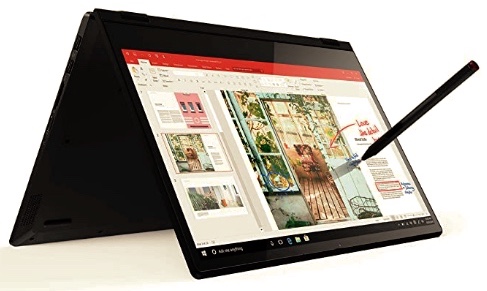
A step up from those basic 2 in 1 devices is the Lenovo Flex 14” 2-in-1 Convertible Laptop, FHD Touchscreen Display, 12GB DDR4 RAM, 256GB SSD, Windows 10 pictured here.


Most everyone these days are addicted to the internet and people find it strange when we try and prepare for long stretches without having access. I have been in a couple of discussions with computer companies about back-up system software in case of an emergency (rarely are CD drives included any more). Apple once agreed and sold me a system installer on a thumb drive before it was widely available – just in case. Six months later I needed it and it would not allow reloading without being able to confirm the purchase on the internet!! Now carrying a compact bootable drive and having a second device is always part of our plan. I carry a couple of travel hard drives (about the size of a cell phone) with 1 and 2 Tb of storage and back up data from both laptops to partitions on a configured drive regularly. I avoid backup software schemes because they can be a problem if switching to a shared laptop.

Tablets and iPads


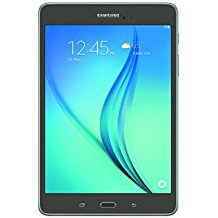
We are avid readers and we were in the habit of traveling with a number of books but have now turned to tablets as our reading preference. For the last few years our tablets are our must have travel accessory. Not only for reading but we also have travel apps to keep track of itineraries, music, movies, an atlas, games all with an emphasis on being off-line. Before the last trip we went through our tablets to sort titles and between us we had 22 unread books (mostly mysteries) as well as a number of travel guide books that we select from for each trip. If you haven’t looked into travel guides in ebook or pdf format they can be an excellent reference while on the road. If you are a Prime member be sure and keep an eye on Amazon books for their free offers and 99¢ specials. I also use Google to download free copies of classic books.


While it is true that a real book never made me stop reading to recharge, that seems a small price to pay for the convenience. We have both an iPad and an Android and they both seem to work about the same using apps for Nook, Kindle and Google Play Books. The iPad syncs files better until we go out of the country and then iCloud starts having security issues and can be a headache. The same with Apple email accounts and international travel.


Cell Phones and International Cell Service


As mentioned in previous posts we have used Verizon as our primary cell service but we have given up after numerous international travel problems. I can’t even count the number of places we have been where Verizon phones didn’t work or service wasn’t available. The one thing we discovered was that most of the travelers we met that seemed to be using their cell phones when we couldn’t were T-Mobile customers.

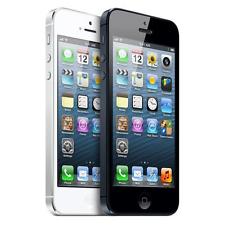
We now carry a newer iPhone, an Android on T-Mobile and a dual-sim Android phone for when data isn’t available and Apple messaging becomes a problem. The Android phone also has a OneSimCard service sim installed. Often I can find service with OneSimCard when others fail to connect.

Good Apps For Travelers


MyTSA for Android and iOS- Nothing fancy but MyTSA is the official app of the Transportation Security Administration and it can provide you with good information getting to your flight by checking wait times at security checkpoints at major airports. The app includes historical wait-time data while also giving you the option of checking crowd-sourced reports of how long security lines are at that moment.

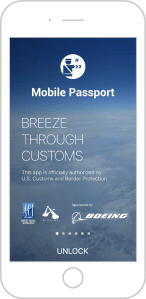
Mobile Passport for Android and iOS is a U.S. Customs and Border Protection-approved app that helps speed you through lengthy immigration lines by letting users with U.S. or Canadian passports submit their passport control and customs declarations through the app. MORE HERE.

TripIt for Android and iOS TripIt is free and allows you to consolidate your travel plans into a simple, convenient itinerary. Viewable online and synced to your cell phone, you can also share itineraries with your contacts. Auto connect to email travel confirmations. MORE HERE.

Save On Internationally Calls While traveling With VoIP Apps


Viber – in addition to free, texts, Viber allows you to place voice calls over data or Wi-Fi to any other Viber user, anywhere in the world, for free. If you’d need to place VoIP calls to landlines and other mobile users, you can, with Viber’s Viber Out service. Viber Out calls will cost you, but they start at 1.9 cents per minute and vary depending on the country you’re calling. Viber is also cross platform, with apps for Android, iOS, Blackberry and Windows Phones.
Skype – Skype is a major player in free VoIP calling and texting, and like the others it offers absolutely free voice as well as video calls to other people who also use Skype. Skype was the first service to give you free calling in-network and rates for calling out of the system.
MagicApp – Most people know MagicJack as that plug-in that lets you use your home phones as VoIP phones and send your calls over the internet instead. We’ve been using Magicjack for over ten years and now use the app as well. If you have a MagicJack device, you can use that phone number for your mobile calls as well using their app, and even get calls from your device at home routed to your smartphone when you’re away.

International Travel, Cruising and Text Messaging with iPhones


One issue we discovered recently with a trans-Atlantic cruise involved texting onboard using iPhones and iMessage. Because of the cost of placing phone calls at sea our preferred method of contact is texting. We have several family members that also use iPhones and texting with them completely failed. It seems that iMessage uses cellular data to send and receive messages and generally cellular service on ship is very expensive and data doesn’t work at times – so no texting with making major chnages with your iPhone. Oddly, not all but often cell company service support reps seem unaware of the iPhone texting issues.


The best hope is to turn iMessage off and make sure SMS is active (also I would recommend turning MMS off as big photos and videos will get costly on data). This will solve most issues but there can be some problems if the person back home is an iPhone user with iMessage turned on. If you believe this is still a problem with the other person they need to also turn iMessage off to exchange text with you.


Entertainment Without Internet

Click For More Information


While traveling on extended trips we often find ourselves in media and internet impoverished areas and sometimes having some shows to watch comes in handy. We use two approaches as we travel. I download shows into our tablets, mostly using Google Play and Netflix (often free) or I convert some movies to MP4 and load a travel compact hard drive. One thing we have found essential is a small plug-in battery operated speaker. The current one is 2”x2”x1.5” and produces great sound (EWA $15). Comes in handy when watching shows in bed in the evening on a laptop or tablet.

We both have tablets and between us we carry a few dozen books in various apps, mostly Amazon and Google books [their apps] and B&N Nook. We do not use Apple eBooks or iTunes because we have often had authorization issues internationally when we couldn’t do anything to resolve the issues.


Miscellaneous Gear


We also have a compact set of chargers and cables that are part of our travel gear. Many of these items have been selected after a lot of trial and error over the years. Here are some of our favorites.

Click For More Information

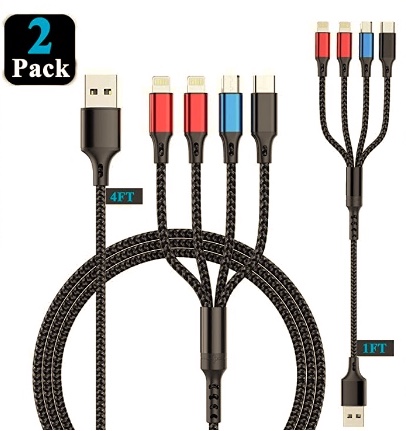
3 in 1 and 4 in 1 charging cables – eliminate that spaghetti tangle and need to carry a number of cables. Our collection includes octopus end USB plug with iOS last gen, Type C and Micro USB tips and an older one that includes iOS/Micro-USB/Mini -USB that will do data transfer too.

Click For More Information


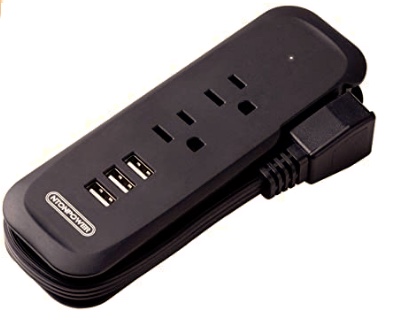
Power Strip with Extension cord – One headache while traveling is keeping that gear charged. Often in hotels and while cruising we find outlets that don’t allow some chargers to fit into the space around the outlet or there simply aren’t enough outlets. Our answer is this Travel Power Strip. Compact with 2 USB ports and 2 outlets the real feature is a short extension cord that stows tightly on the power strip.

Click For More Information


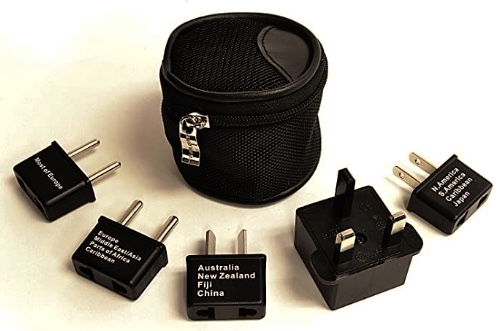
International plug adaptors – While today most electronics don’t need power converters you still need plug adaptors. All you need travel with is the adaptor for the countries you’re visiting. This is a great inexpensive set of plug adaptors that take up no space.


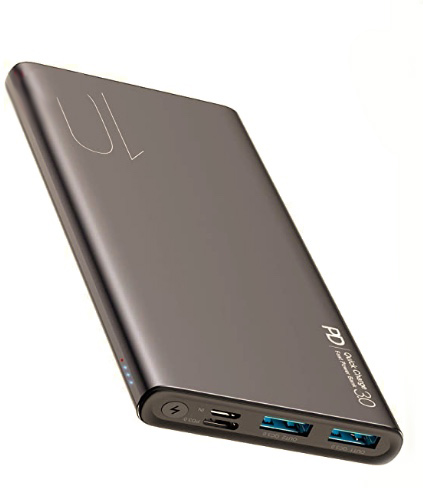
Power banks – These devices come in all shapes and sizes but when selecting pay attention that the device fits your needs. Do you need multiply charging ports? Will your device fast charge? This is our choice for one that fills a number of requirements.


In addition to the above I always carry A USB plug SD card reader and a short USB extension cable and unfortunately a couple of device specific chargers/converters.

That rounds out our collection of travel electronics but we are always looking for tips on travel electronics and are now using Movavi software for downloading video after one subscriber suggested it. Any ideas or tricks? Please let us know.

A FastPass Thru U.S. Immigration

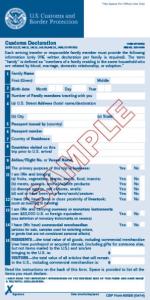
A bit of an introduction to our adventures with Customs and Immigration. Before a few years ago, when returning to the United States, there weren’t a lot of choices, so we would fill out our custom form, pick a line (always the slowest moving) and wait for our turn with an agent. Rarely did things go quickly. Today there are a number of travel options for speeding up those processes dealing with the government.

  • TSA Pre-Clearance – Costs $85 and gets you through airport security with a faster screening.
  • Global Entry – Costs $100 and gives you a fast-pass through immigration and includes TSA-Pre.
  • Nexus– Costs $50 and allows Americans and Canadians fast immigration checks at airports and boarder crossings.
  • Sentri – Costs $122.50, is similar to Nexus and includes Mexicans.

A couple of years ago we discovered Mobile Passport and added the app to our phones and it really did get us quickly through immigration. Over a year ago we decided that we would apply for Global Entry since in 2020 we would be leaving and re-entering the country at least five times and would be flying with a number of airlines that did not normally provide us with TSA Pre-Clear.

Well, 2020 didn’t work out as planned and we haven’t left the country yet. In addition my wife got Global Entry and and I’m still waiting to be allowed an interview.

When my wife went in for her Homeland Security interview we spent some time talking with agents and came away with some good suggestions. The agents recommendation was to get the Mobile Passport app even if you have Global Entry. While it doesn’t provide for TSA-Pre it often gets you through immigration faster than even Global Entry and at $15 a year it’s well worth it for frequent international travelers. One comment they had was often the system on their side doesn’t work, they still just wave Mobile Passport people through.

Did you know there’s an App for that?

While we were excited some time ago with the self-service kiosks that were being installed at a number of locations. After a few times through that system we realized this wasn’t the answer to our prayers. It just didn’t happen that fast. You had to scan your passport and everyone had to do it – not just the head of household. You had to get your picture taken by the kiosk than respond to CBP inspection questions and submit biographic information, whatever that was. After that you were given a printout strip and than you went and stood in line again anyway.

While traveling we have come to realize that some other countries have figured out how to get people thru the process. Our favorite is Australia – scan your passport at a kiosk, tick off a couple answers and show the receipt to the nice person as you exit. Maybe the online visa Australia makes you get helps them with the process though? Somehow going thru our CPB process doesn’t make me feel any safer coming into the U.S. than entering Australia

The Real Solution

Starting two years ago we started using the U.S. CBP approved App Mobile Passport. First you have to download the Mobile Passport App on your iPhone or Android device, it’s free. Use the App to scan your passport and save the information to the system.

Here’s what to do when you arrive back in the U.S. using the Mobile Passport website. Once you are at your port of entry (airport or sea port), open the app and connect to wireless or wi-fi, fill out the information and click to submit your data to CBP. Remember: when you submit, you are confirming under penalty of law that your information is correct. Within a few seconds, you will receive a CBP receipt with an encrypted barcode. Your receipt will be valid for 4 hours.

No more customs forms!

Next follow the Mobile Passport Control signs to the designated Mobile Passport Control line. Show your passport to the CBP officer and they scan the barcode on the digital CBP receipt. And that’s it!

The system is currently active at twenty-four U.S. airports and three cruise ports with more planned.

After the first year we had to pay a $15 annual subscription fee in order for the Mobile Passport to continue to store your passport information but we now consider that a small price to pay.

Current Mobile Passport points of entry.

St. Croix, America’s Other Virgin Island

St Croix, USVI

The United States Virgin Islands is comprised of three principal islands, St. Thomas, St. Croix and St. John. At 84 square miles, St. Croix is the largest island in the Virgin Island group and significantly more rural than its brother, St. Thomas. The island features a rain forest in its western interior, an arid climate with cactus in the east and two historic towns.

The island was a possession of Denmark until the early nineteenth century and boasts a deepwater working port on the south coast along with a large pier at the west-end town of Fredireksted. Historically the port was defended by Fort Fredirek as far back as the mid eighteenth century. The deepwater industrial port was developed in the twentieth century and services an oil refinery and cargo ships. The island, along with St. Thomas and St. John was bought by the United States in the early nineteenth century. That means you don’t need a passport to visit and you can bring back five liters of liquor duty free.

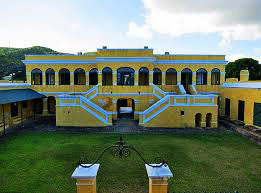
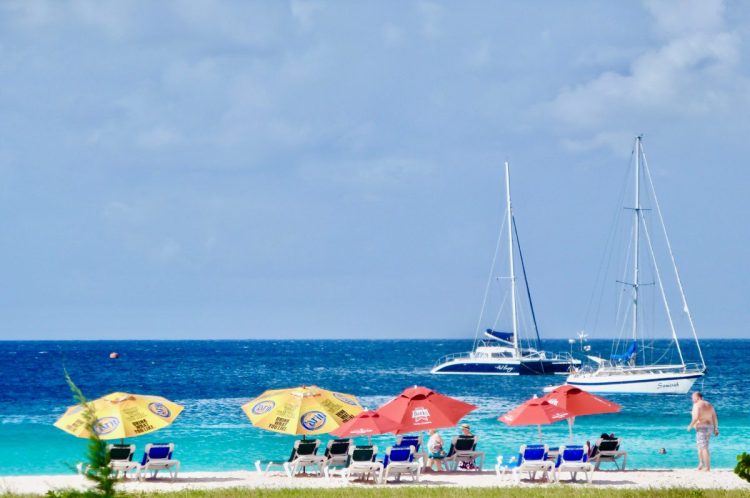
Christiansted is the other town on the island and represents the quintessential tropical waterfront. Christiansted is located on the north central coast. The waterfront is fringed with a boardwalk and small boat docks, protected by a natural reef and a close-in small island. The harbor features sailboats at anchor, crystal clear water and a number of small hotels and restaurants along the waterfront. Around the waterfront is a colonial town that has changed little in a couple of hundred years. It is remarkable for the stone and brick buildings that include covered colonnades protecting the sidewalks from those frequent tropical showers. Most of these buildings feature art and craft galleries, shops, restaurants along with a couple of small hotels. Just to the east on the waterfront is the old Fort Christiansvaern operated by the U.S. Park Service. The small island in the harbor is Protestant Cay and features the Hotel on the Cay which is serviced by hotel launches.

Historic Christiansted is actually the center of activity on St. Croix and has a number of nice, small hotels like King’s Alley, Holger Danske, Caravelle, The Hotel on the Cay, The Danish Manor (now the Company House Hotel).

This is a large island and to get around you need to rent a car and remember that the Virgin Islands traffic drives on the left even though most cars are right-hand drive. If you aren’t up to driving, staying in Christiansted isn’t a bad option with the restaurants, shops and the beach at The Hotel on the Cay. (You can take the hotel launch over for a fee if you aren’t a guest) or you can stay at any number of island resorts.

Most of the beachfront resorts are clustered in three locations on the island. The most popular resort area on the island is the eastern north shore with the centerpiece being the Buccaneer Resort and Golf Course. The Buccaneer has been an institution on the island forever and deserves its’ high marks. A little further along the coast are the Tamarind Beach and Chenay Bay resorts. They both have good beaches and Chenay Bay offers cabinst.

Crossing the island to the east end of the south shore there are a couple of resorts centered on Divi Carina Bay Resort. There are good beaches and snorkeling along that shore with great coral reefs close in to shore in reasonably shallow water.

Another area for great beaches and good snorkeling, is Davis Bay. Located along the western north coast it has always been pretty isolated and primitive but the beaches are some of the best on the island. Some thirty years ago the Rock Resort people built an exclusive resort above Davis Bay called the Carambola Resort but a combination of things, including hurricane Hugo, caused the venture to fail. Today it is alive as the Renaissance St. Croix Carambola Resort and, based on location alone, it is well worth consideration.

There are also a number of apartment and condo developments like Mill Harbor that offer rental units along with Colony Cove and Sugar Beach. While a little out of town, the beaches are nice and the amenities are good.

One offbeat attraction predates tourists at the Montpellier Domino Club located up in St. Croix’s rain forest. Visiting what is just a local bar you’re expected to buy the pig a beer by simply tossing a can into the pen attached to the club. The pig would pick up the can, raise its head, crush the can and drink. If you got there too late (or early depending on the perspective), the pig was passed out drunk. The Montpellier Domino Club it seems has gone through a number of pigs and it now seems to be a “must do” tourist destination.

Of historical interest are the two colonial fortifications on the island, several historic buildings in Christiansted and on Centerline Road east of Fredireksted is the Whim Great House and museum. Whim is the only plantation great house surviving in the Virgin Islands.

If you are a skin or scuba diver, or just a novice swimmer, one real “must do” on St. Croix is to visit the underwater National Park at Buck Island Reef where the whole island, not just the reef, is the park. Located 1.5 miles off the northeast coast, there are a number of boat tours from Christiansted out to the area and the reef is spectacular. There is also an underwater trail on the eastern tip. If you can convince yourself to take this trip and put on a face mask you will never forget it.

The island has a number of good restaurants but the scene changes regularly so it’s best to refer to current reviews. While there are a number of fast food places on St. Croix one favorite for locals and visitors is Cheeseburgers in Paradise out on the northeast coast road.

While there aren’t a lot of cruise ships visiting some do spend a day tied up to the Fredireksted pier and, if this is how you come to St. Croix, we would recommend that you rent a car and spend your day driving around the island. The scenery is breathtaking with the rugged coast along North Shore Road and Cane Bay Road worth the trip. Along Centerline Road visit the Estate Whim Museum, the only surviving plantation great house in the Virgin Islands. Go into Christiansted for lunch and a walk around and return to Fredireksted via the rain forest on Mahogany Road.

The Map Room

Navigating on our cellphones is great but sometimes the best option is still a paper map. Over the years we have collected maps while visiting places around the world and have marked them up with attractions to see and routes to follow. On occasion we modify maps before our trip to simplify understanding a place and how to best get around. Here we offer a number of our modified maps that cover major cities, metro transit systems, parks and hiking trails. We encourage you to download and print these pdf files to help plan for future trips. Click any map to set-up your download.

FREE AND SAFE TO DOWNLOAD

Seeing Budapest using public transportation – Budapest is a wonderful city with a remarkable public transportation system. Modern light rail and subways can take you all around the city.

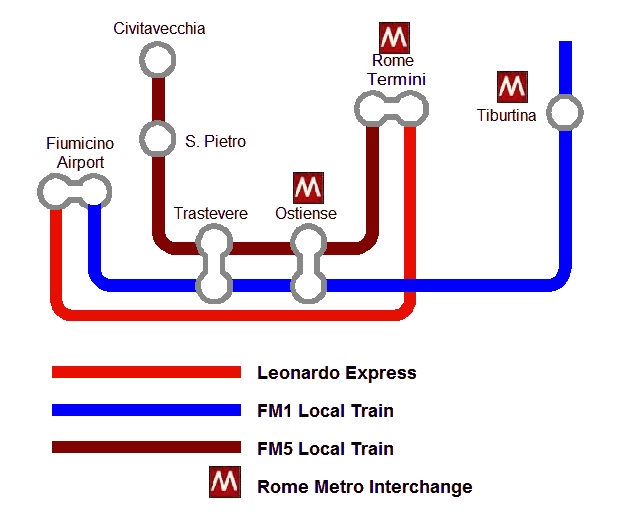
The Trains of Metro Rome Rome is a large metropolitan area with commuter trains servicing the international airport, the historic center and the seaport of Civitavecchia. Using public transportation can save time and money.

Bus routes on Maui, Hawaii – This island has an incredible public bus system that will take you around the whole island except up through the National Park.

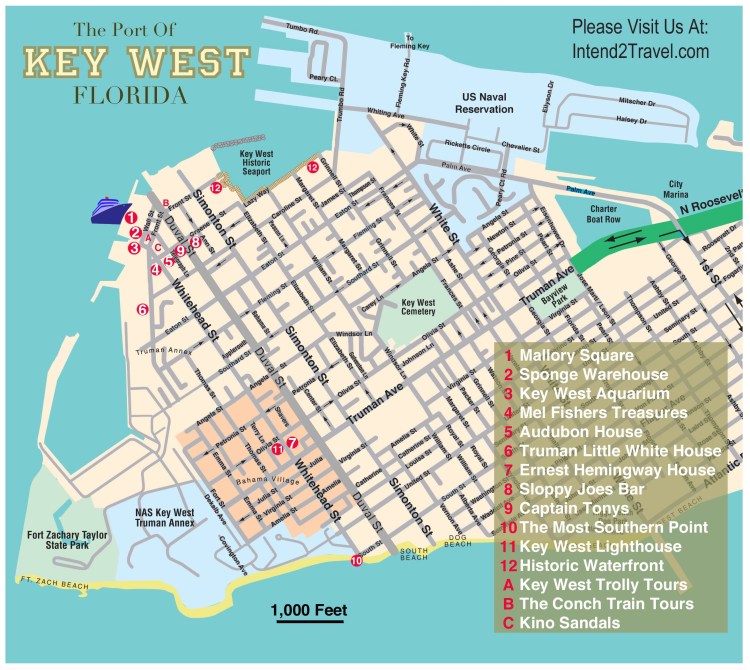
Key West Florida is an American original – Easy to get around on foot the heart of this town is a joy to explore.

Public transportation Sydney Australia – A fantastic, modern city with a great public transportation system that includes regional trains, light rail and a fleet of ferries.

Driving Oahu and seeing the attractions – Oahu is an island you need to drive around but there are- a couple of bus routes that service Honolulu and the Pearl Harbor area that are convenient


Walking tour of Florence – City walking tours are all the rage now and this one lays out a self-guided tour of this city south of the Arno.

Rome’s Metro System – A simplified guide to Rome’s Metro system from the port of Civitavecchia to the International Airport.

The Forum in Rome – A 3D map of this ancient Roman site.

One day tour of Rome – A guide to hitting the major sites in just 8 hours on your own.

Paris Metro – a simplified guide – The Paris Metro is world renowned and here we offer a simplified system map focused on the main tourist destinations.

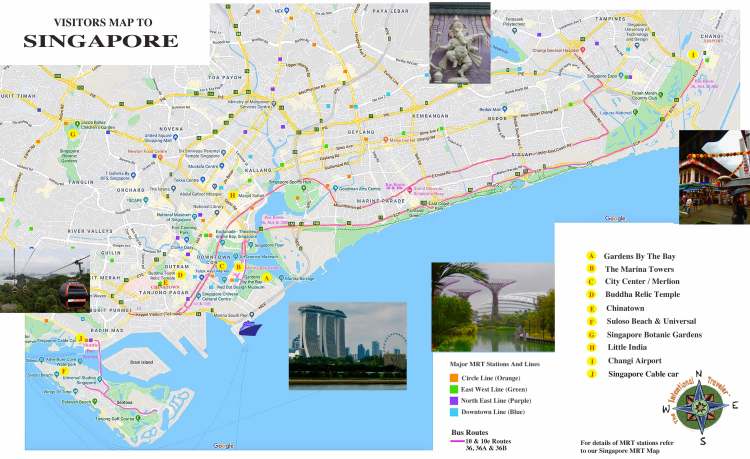
Singapore Metro Map – Inexpensive, incredibly clean and efficient this city’s metro is one of the best in the world.

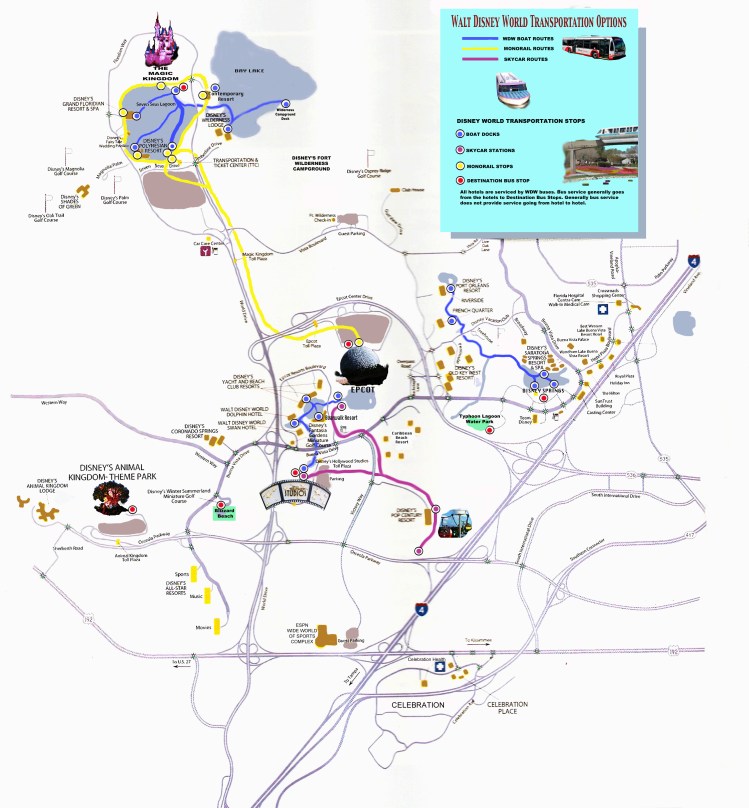
Disney World Transportation Systems– Larger than New York’s Manhattan the Disney people have provided an efficient system to get you around that includes buses, boats, monorails and cable car

Tourist Guide to Singapore bus routes – In addition to the Metro there is a modern fleet of mostly double-decker buses that can take you around the central city, along the coastal Marine Parade area to the airport.

The Trails of Iguazu Falls Argentina This park has over 30 miles of trails and it’s important to know which ones are the most spectacular to get the most from your visit.

The New York subways are fast way to see Manhattan and this map eliminates everything but the Manhattan stops and the locations of major sites


Yellowstone National Park is the size of the state of Delaware and you should need a plan before you get there. Here are 5 major attractions along with driving routes.

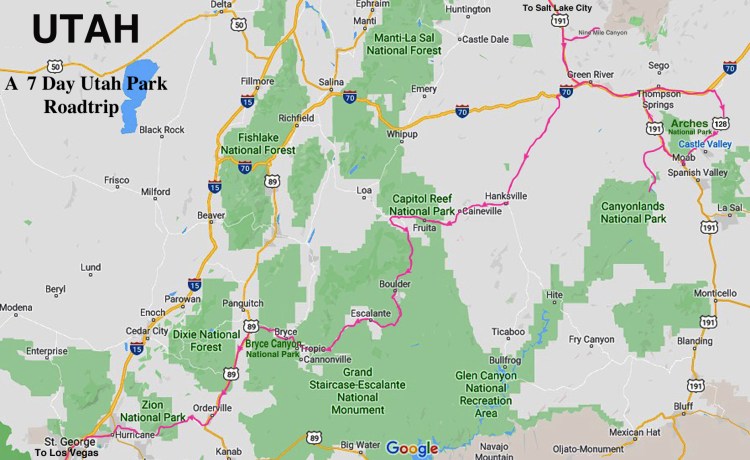
Utah Driving Park Tour – Utah has the countries largest collections of National Parks along with some great state parks

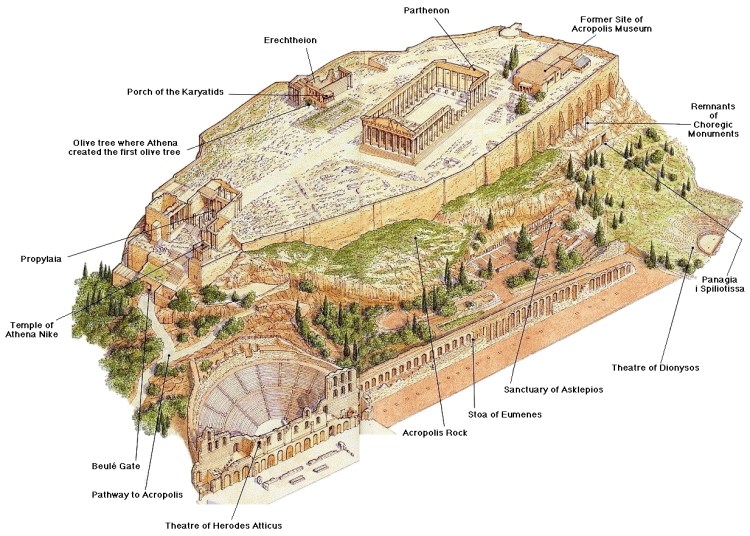
The Acropolis in Athens – A 3D map of this ancient sit

Mendenhall Glacier – Hiking trails around the glacier and the glacial lak

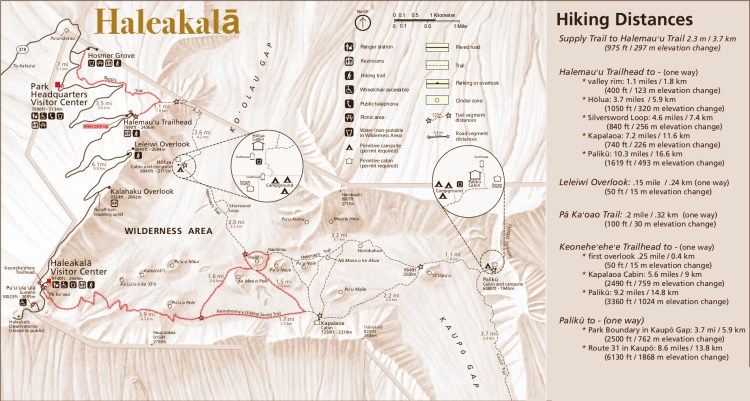
Hiking Haleakalā National Park – Hiking trails on Maui’s great volcano


Sydney Australia and the Opal Card

Getting Around Sydney

If you are planning a trip Down Under with some time in Sydney, you need to build your plans around their great public transportation. Like most large cities, buses are plentiful but Sydney also boasts a metro rail system and an express system called “Light Rail” that connects most major parts of the metropolitan area along with a regional conventional railroad network along with a fantastic ferry system. The metro and light rail boasts frequent service and cars that are modern, clean and comfortable.

Riding on the entire system is based on the Opal Card which is a  “tap on – tap off” system. You can buy a one trip card or a card that can be loaded with specific amounts of money. Each time you board, you tap your Opal against the sensor pad and again when you exit. At ferry terminals and metro stations the “tap sensor” is usually associated with a turnstile and on buses and light rail the tap post is usually at the car entrance. Be sure and tap as there are conductors that come through occasionally with readers to check that you did.

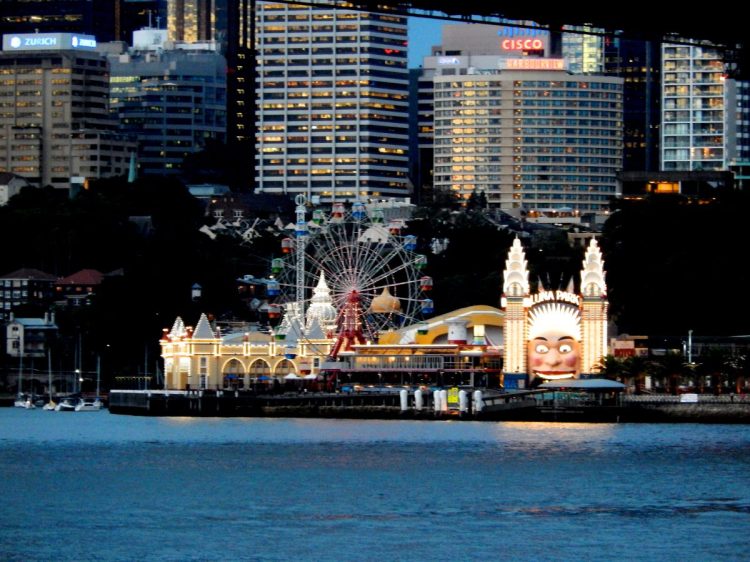
Luna Park Sydney

From the neighborhoods around Central there are any number of metro stops that will get you to Convention, Exhibit stops, Darling Harbour, Bondi Junction, Circular Quay and Fish Market all in less than a half hour. In addition, the extensive Sydney harbor region is crisscrossed with dozens of ferries which all seem to converge on Circular Quay located between The Rocks and the famous Sydney Opera House.

Even without a destination, taking a ferry is a great way to see the sights around the harbor and the city skyline. Ferries from the Quay take you out to Watson’s Bay (be sure and have fish ‘n chips at Doyle’s on the Beach), Manley Beach (a popular ocean front beach town noted for good surfing) and across to Luna Park, Sydney’s classic amusement park.

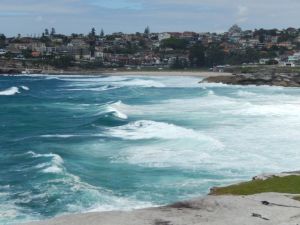
The Famous Bondi Beach
Sydney Harbour Bridge

If all this wasn’t good enough, there is also a multi-day fare system based on the Opal Card. You buy the card with your choice of an amount loaded (you can also reload) and than tap on and tap off on all of the above systems as well as the regional rail lines. But here’s the best part. As you use the card there is a maximum daily fare of A$15 (A$7.50 for children) with Sundays capped at A$2.50. That means you can ride all day for no more that A$15.

Taking a train to the Blue Mountains over an hour and a half from Sydney on a Sunday, spending the day and returning, go to Darling Harbour for dinner and back to your hotel costs all of A$2.50. There is also a weekly cap of A$60 with the card as well and, after eight paid journeys with Opal, you can travel for the rest of the week for half-price fare.

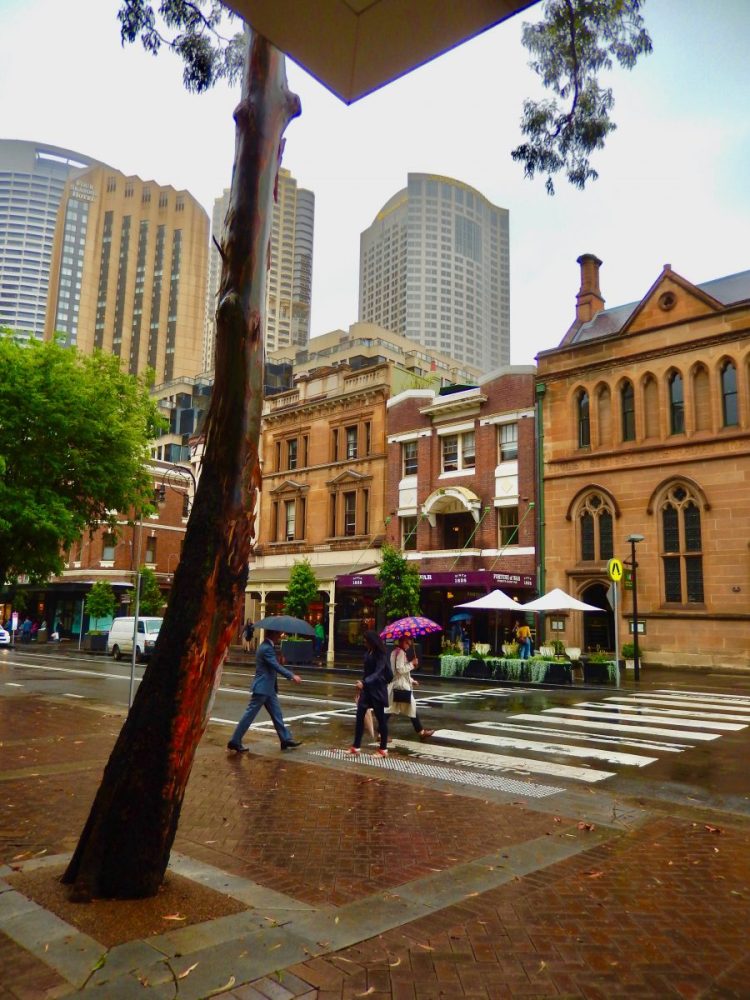
The Historic Rocks

Sydney is a very walkable city. The focus of the downtown area (CBD) is the Circular Quay and The Rocks. Facing the water at the Quay, the Opera House is to your right with a number of restaurants and shops nearby and the ferries straight ahead. Off to the left is The Rocks, the location of the original English settlement at the harbor with a number of popular shops, restaurants, galleries and museums. Some of the museums offer free or reduced entry admissions so be sure to check this out if you are in the area.

A short walk From The Rocks is the approach to the Sydney Harbour Bridge, which is worth the climb up to its walkway for the view. If you are really adventurous and aren’t afraid of heights you can book a climbing tour up the suspension cables to the very top. A dozen blocks west and south is the Kings Street Wharf and Darling Harbour area with a great waterside walk lined with restaurants and tourist attractions including a wildlife center, an extension of the Sydney zoo and the aquarium.

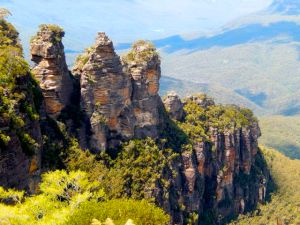
Three Sisters in the Blue Mountai

A metro rail trip out to the town of Bondi with a bus connection at the station to the famous Bondi Beach itself will take about forty minutes from the Central station area.

Often getting around a large city as a tourist can get costly but not Sydney with a Opal Card.

CLICK THIS MAP TO DOWNLOAD YOUR PDF COPY